Find the personal data on your websites
Point it at a website, a Public Information Bulletin too, and a crawler reads its pages, attachments and scans. You get a list of findings, all in your infrastructure.
Priced individually, depending on the scope of the deployment
From a website address to a document to review
For example a Public Information Bulletin archive, a university’s faculty websites or an attachment repository before a site migration.
Point it at a website
You add the address and set the scope of the scan. You don’t list files one by one: the crawler reaches the site’s publications itself.
The program analyzes the content
The crawler visits the pages and downloads the attachments. OCR also reads scans, and detection finds the personal data in the content.
Assess the findings
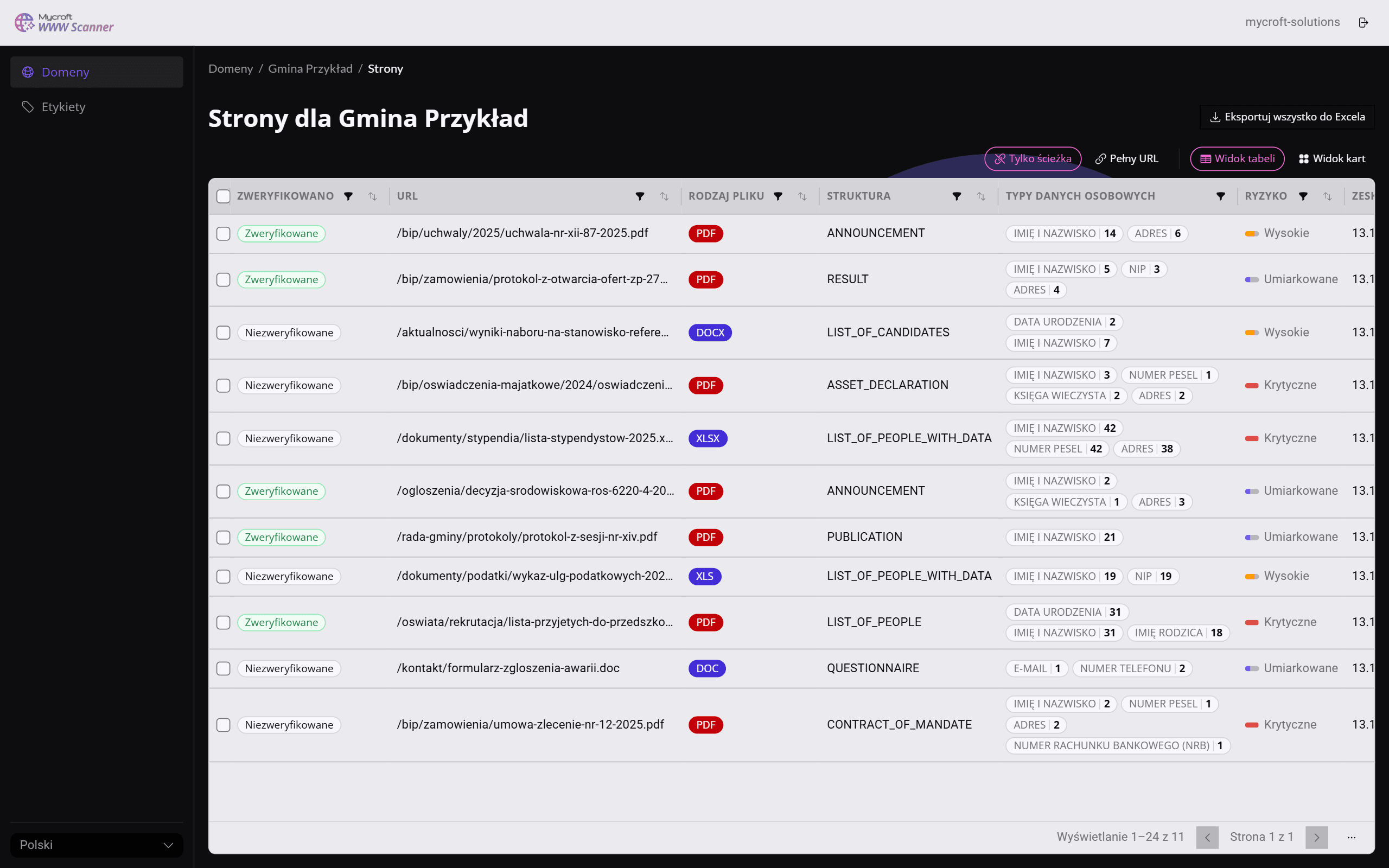
You get a list with the location of every finding. You check the context and decide whether to correct the publication, remove it or leave it.
You know what was found and where to look for it
Every finding leads to the page or attachment it appears in. A finding alone doesn’t mean something has to go: a work email address may be published on purpose, while an ID number in an attachment may need checking.
Publication control for large websites
Many websites in parallel
A large website doesn’t hold up the others. You combine related domains and subdomains into one website with a shared configuration.
Scan scheduling
You set scan windows, for example at night or at weekends, and after each scan you see what’s new or changed.
Dictionaries and labels
You label known data, such as public contact addresses, so attention stays on what nobody has assessed yet.
Results while the scan runs
Summaries build up as the scan runs, which makes filtering and sorting findings on large websites easier.
An Excel export of the whole scan
The report is built in the background and covers the whole scan. Other users in your organization can download the finished file too.
Radar finds it, Sweeper fixes it
When a publication needs correcting, the document can be anonymized in Sweeper and published again. Your team then checks only what Radar pointed out.

What a deployment looks like
A conversation about scope
We agree which websites and domains to cover and how often to check them.
Installation on your premises
We set up WWW Radar together with your IT team, on your own server.
Configuration
We add the websites, set the scanning windows and create the dictionaries.
First results
We walk your team through the first scan and agree how findings will be reviewed.
What the quote depends on
- Number of domains
- Size of the domains, including attachments
- Scope of support
We prepare the quote after a talk about your scope.
Downloads
Documents
Frequently asked questions
What data does WWW Radar find?
Among others first names and surnames, PESEL numbers, email addresses and phone numbers, on pages and in attachments, scans read by OCR included.
Do we have to review the same content again?
No. The review status belongs to the content: unchanged material keeps it in later scans, and when the content changes, the result goes back for review.
Will data from the page footer swamp the results?
Values repeated across the whole website can be hidden from view, so you can focus on individual findings. Hiding them doesn’t remove them from the results.
Does WWW Radar change anything on the website by itself?
No. WWW Radar points out the data and where it appears. Your organization decides what gets published.
Does WWW Radar also check files on computers?
No, it analyzes websites. Endpoint Radar searches the computers’ resources.
What does WWW Radar need in order to run?
A server in your infrastructure, with support for Docker containers and a connection to the websites it scans. WWW Radar runs only on your premises: we don’t run it on our servers. We settle the details during deployment.
Can the results feed into our own systems?
Yes, through an agreed integration, for example to prepare corrected documents. We agree the scope during deployment.
Next step
See what WWW Radar can do for your organization.
Tell us what you need, and we will come back with a proposal for your organization.